Compare the top 5 bare-metal hypervisors
Hypervisors such as VMware vSphere, Microsoft Hyper-V, Citrix Hypervisor, RHV and Oracle VM Server for x86 provide value to enterprise-level data centers in different ways.

Bare-metal hypervisors can vary wildly in terms of features, performance and interoperability with important platforms, such as enterprise systems management tools. If you want to add or change a bare-metal hypervisor, you should carefully evaluate each product before selection.
Virtualization is an essential enabling technology for any enterprise, and hypervisors are the critical software component that abstracts underlying hardware resources and makes those resources available to VMs. By decoupling applications and services from physical hardware, virtualization enables faster workload deployment, better workload protection and greater flexibility for business IT.
Bare-metal hypervisors
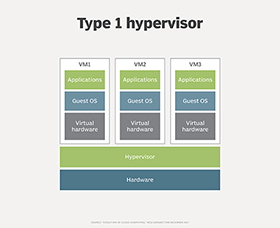
A bare-metal or Type 1 hypervisor is intended to load and run when a system first starts, establishing the hypervisor before any applications or even an OS loads. Thus, Type 1 hypervisors operate directly on a machine's bare-metal hardware. Once the bare metal is loaded, the virtualized system can create and load VMs that are fully logically isolated from one another.
Each VM contains its own OS, such as Linux or Windows Server. Often, the first VM to load is a systems/host management tool, such as Microsoft System Center. After that, the host system can operate numerous VMs to the limit of its virtualized processors, memory and other resources.
Since bare-metal hypervisors operate directly on a system's hardware, these Type 1 offerings are often referred to as OSes in their own right and can provide excellent performance in managing and running many VMs simultaneously on a computer system. As a result, bare-metal hypervisors are almost always deployed on server-class computers in enterprise data centers.
Read on to find out which is the best hypervisor for your business.
VMware vSphere
VMware is regarded as a market leader in hypervisor technology, bundling the ESXi hypervisor into the VMware's vSphere product package. VMware vSphere version 6.7 is available in Standard, Enterprise Plus and Platinum editions, each offering a varied suite of features -- such as vMotion, vSphere Replication, Distributed Resource Scheduler and Distributed Power Management -- that address common IT and business goals, including business continuity, security, software-defined data center/hybrid cloud capabilities, resource prioritization and performance enhancement. You can manage VMware vSphere through vCenter Server -- available separately -- but it's also well-supported by many other common management tools.
VMware vSphere can be costly and complex to license because of its varied editions and annual support options. As an example, VMware vSphere Standard Edition licensing starts at $995 per year per license, with production support adding another $323 per year per license. By comparison, vSphere Platinum licensing starts at $4,595 per year per license -- with a one-year subscription to VMware AppDefense -- and an additional $1,049 per year per license for production support. Lower-cost licensing alternatives are available for small to midsize organizations, and you can obtain the basic ESXi hypervisor and vSphere for a free 60-day trial.
Microsoft Hyper-V
Microsoft also holds a large portion of the enterprise hypervisor market with the Hyper-V hypervisor available with Windows Server 2008 and later, as well as Pro and Enterprise editions of Windows 8, Windows 8.1 and Windows 10. The release of Windows Server 2019 continues strong support and integration of Hyper-V, and the hypervisor supports varied Windows and Linux guest OSes, including Windows XP Service Pack 3, Windows Vista, Windows 7 and later, along with versions of SUSE Linux Enterprise Server (SLES), Red Hat Enterprise Linux (RHEL), CentOS, Ubuntu, Debian and Oracle Linux.
Each evolving version of Windows Server added features and functionality to Hyper-V. As examples, Windows Server 2012 and R2 added features including Hyper-V extensible virtual switch, network virtualization, multi-tenancy, storage resource pools, offloaded data transfers, Hyper-V replica, cloud backup, shared virtual hard disk, storage quality of service, enhanced session mode and automatic VM activation. Windows Server 2016 added nested virtualization, discrete device assignment, Windows containers, shielded VMs and enhanced monitoring. Windows Server 2019 brought Linux compatibility to shielded VMs, VM encrypted networks, vSwitch receive segment coalescing, dynamic VM multiqueue, persistent memory support, and improvements to Storage Spaces Direct and failover clustering.
Hyper-V is tightly integrated with current Windows versions and is often the preferred hypervisor for Windows-centric organizations. It's also possible to activate and use Hyper-V on almost any current Windows platform, other than starter Home licenses. Licensing and costs can be a complex issue for Hyper-V. Since Hyper-V is currently a free component of Windows and Windows Server, there's generally no separate licensing to use Hyper-V; the cost is the OS license, not the hypervisor. And current base costs for Windows Server 2019 range from $500 to over $6,000 per license depending on the version -- Essentials, Standard or Datacenter -- and additional costs might be incurred to integrate Windows and Hyper-V with other platforms such as Microsoft System Center. It's best to consult with Microsoft licensing experts to determine the best license arrangement for your own particular organization.
Citrix Hypervisor
Citrix entered the hypervisor marketplace with an open source XenServer project. Citrix Hypervisor 7.6 -- formerly XenServer -- continues to compete and attract attention in the hypervisor market as an enterprise-class 64-bit platform that supports use cases such as virtual desktop infrastructure and server consolidation. Citrix Hypervisor is available in Express, Standard and Premium versions with features that include myriad different management, networking, resilience, storage, graphics and security capabilities that are well-suited to enterprise production environments.
Although Citrix Hypervisor started as an open source project, it will incur costs in an enterprise setting. You can download and try Citrix Hypervisor with up to 12 CPU sockets for up to 90 days. But if you intend to use Citrix Hypervisor in a production environment, you must purchase a license for the Standard or Enterprise hypervisor edition. The hypervisor is typically licensed per socket and costs range from $763 per socket for the Standard edition to $1,525 per socket for the Enterprise edition, along with 22% of that cost for annual maintenance and support.
Red Hat Virtualization
Red Hat Virtualization (RHV) 4.2 is an open platform built on RHEL and KVM that you can use to virtualize both Linux and Microsoft Windows workloads. RHV provides centralized management -- such as informational dashboards -- security hardening with Secure Virtualization and Security-Enhanced Linux technologies, high availability (HA), automation and orchestration, and support for workloads, including Windows Server 2008, 2008 R2, 2012 (32- and 64-bit) and 2016; Windows 7 and 10 (32- and 64-bit); and SLES 10, 11 and 12. RHV is a popular choice for Linux organizations that currently use a Red Hat infrastructure. As of April 2019, Version 4.3 is currently in beta.
You can evaluate RHV free for 60 days, which includes access to Red Hat's customer portal, knowledge base and documentation. However, the evaluation isn't intended for production environments. RHV is priced through a subscription structure rather than a license approach. A subscription includes workstations and server virtualization, as well as Red Hat Virtualization Manager, Red Hat Virtualization Host, all product features and product support. Normal (business hours) support subscriptions cost $999 annually for each managed hypervisor socket pair, while Premium (24/7/365) support subscriptions cost $1,499 annually for each managed hypervisor socket pair.
Oracle VM Server for x86
Originally based on open source Xen, the Oracle VM Server platform is suitable for data centers and cloud adopters. The hypervisor offers performance and scalability to 384 physical CPUs and 6 TB of memory -- with each guest VM handling up to 256 vCPUs -- along with broad guest OS support, including Oracle Linux, Oracle Solaris, RHEL, SLES, CentOS and Microsoft Windows. Strong security is provided through Oracle Unbreakable Enterprise Kernel Release 4. Additional features include secure live VM migration, storage live VM migration, HA, rapid provisioning and cloning, integrated management and diagnostics. Oracle VM Server for Sparc processors is also available.
Oracle promises a "zero licensing cost" product that's free to download and distribute. However, if you choose to deploy the platform in production, you might consider adding a support plan. Oracle VM Premier Limited Support can cost from $599 to $2,995, while Oracle VM Premier Support can run from $1,199 to $5,995. Actual costs depend on the term per system.